Toby's Log page 99

Givecamp 2011

Last weekend I went to GiveCamp in Cleveland. GiveCamp is a weekend of developers and designers building sites and applications for various charities. There were like 202 people there, working in the Lean Dog boat and in the hallway of Burke Lakefront Airport. There were 22 charities, each assigned a team appropriate to their needs. 21 of the projects were completed or nearly so in the one weekend allotted.

My project was Cleveland Carousel. My team also included a designer named Greg and another developer named Jon Knapp, who kind of managed the project most of the time. We had continuous help from at least one of the Cleveland Carousel people at all times. We also had a couple dedicated project managers come help us out for a little while as well.

The clients had a simple WordPress site in running with four pages, but they want something with a lot more content and pictures and a custom design. They came well prepared with a detailed plan of what they wanted, allowing us to move quickly with our small team. They worked with Greg to come up with a design, worked to put all of the content in place, and gave us continuous feedback as we built the site.

Continue reading post "Givecamp 2011"
Animation queue management for jQuery

jQuery makes it fairly easy to animate DOM elements. Animating a single-step animation on one or more elements is simple with the call of the animate method. Multi-step animations can be more complex because animations are run asynchronously, meaning that they will start running when called but the script will continue onto the next step before the animation is done. For these, jQuery has the ability to queue steps. jQuery automatically queues multiple steps on a single object and dequeues as each completes, so you don’t have to worry about managing things and setting up callbacks. But for more complex animations where multiple elements are animated at different times or other functionality must be performed after an animation step, there is no automatic queuing.

A common practice for simple queuing is to use the “complete” parameter of the animate method or of other similar asynchronous methods that is a callback to be run when the animation is finished. This works nicely when there are a few steps. It becomes more unwieldy though the more steps you add. That is where queue comes in, allowing for adding of as many steps as you want without having to nest in callback after callback.

Continue reading post "Animation queue management for jQuery"

ls colors for both linux and bsd

ls can have nice colors enabled to differentiate between file types easily, but the parameter is different between the BSD version (uses --color) and the GNU Linux version (uses -G). I have been setting up a “bash_profile”, among other things, to be shared between my users on all the POSIX computers I use. Some are Linux, some BSD based. I use Bash on both, and I wanted the colors from ls to be used on both with the shared “bash_profile” file. I couldn’t find anyone else’s solution for this, so I figured one out myself and will post it in case others want the same versatility. I simply test ls with one of the parameters and see if it throws an error. I then can set my aliases with the appropriate parameter. I do it like so:

ls --color > /dev/null 2>&1
if [ $? -eq 0 ]; then
    alias l="ls -F --color"
    alias ll="ls -lh --color"
else
    alias l="ls -FG"
    alias ll="ls -lhG"
fi

My Javascript Practices

It has been quite some time since I’ve posted anything, but I certainly haven’t stopped building websites. One thing I like to find out from other developers is how they do things so I can compare them with what I do and take anything that I like of theirs better, so I’m going to share some of my current practices. I’ll start with javascript, since I just built a javascript heavy site and want to share some more specific javascript stuff in later posts.

Base Library

To begin with, I use a namespace to store all of my javascript variables/objects in. This doesn’t pollute the “global” window object with many variables and drastically reduces the possibility of collisions with other libraries. Since javascript has no actual namespaces, but it does allow for generic objects and the ability to add arbitrary attributes and functions to them, I just create an object and add everything to it. I use __ because it is small and quick to type, can’t really be given any meaning based on the name, and probably won’t be used by someone else.

The only other thing I put in the global namespace is the base object type I instantiate that variable with. I did this as an object so I could conceivably create multiple instances and so that I could declare it later in the file and have all of the site specific code at the top. I call it tmlib since it is my library. So a bare instantiation might look like this:

if(typeof __ === 'undefined') var __ = new tmlib;
__.cfg.whatever = "whatever";
__.scrOnload = function(){
    doSiteSpecificSomething();
}
/*----------
©tmlib
---------*/
function tmlib(){
        this.classes = {};
        this.lib = {};
        this.cfg = {};
    }
    tmlib.prototype.addListeners = function(argElements, argEvent, argFunction, argBubble){
        var fncBubble = (argBubble)?argBubble : false;
        if(!__.lib.isArray(argElements)) argElements = new Array(argElements);
        for(var i = 0; i < argElements.length; ++i){
            var forElement = argElements[i];
            if(forElement.attachEvent)
                forElement.attachEvent("on"+argEvent, argFunction);
            else
                forElement.addEventListener(argEvent, argFunction, fncBubble);
        }
    }
/*--init */
__.addListeners(window, "load", __.scrOnload, false);
Continue reading post "My Javascript Practices"

Taxes: Income Tax Simplification of Forms

Usonian income taxes are crazy complicated and a pain to deal with. They shouldn’t be, especially for normal people: Only people performing complex income related activities should have any need for a tax accountant. There are so many modifiers to promote certain behavior and demote other, but it is very inconsistent and confusing and irrelevant stuff often has to be read through by people for whom it doesn’t apply. Promoting behaviors is good, but it needs to be simplified drastically.

Continue reading post "Taxes: Income Tax Simplification of Forms"

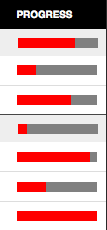
HTML5: The Progress Element


I decided to attempt to use another new HTML 5 element on a site, the <progress> element. This element is used to show the completed progress of a task, perfect for the tasks in a project management application we are making at Cogneato. I wanted it to have the same appearance for all modern browsers, a visual bar indicating percentage complete of a fixed width total bar. As always, this required some special handling for different browsers. Because of the complications, I needed to output different markup for different browsers, so I made a PHP function using server side browser sniffing to give me the proper output. The convoluted function looks like this:

<?php
$glbProgressWidthModifier=0.8;
function generateProgress($value){
    global $glbProgressWidthModifier, $ischrome, $issaf, $isie, $isie9;
    $value = $value * 100;
    ob_start();
?>
<?php if(!$ischrome){ ?><div class="progresswrap">progress  value="" max="100" class="elmprogress" style="width:px;"><span>%</span>></div><?php } ?>    
<?php
    $fncReturn = ob_get_contents();
    ob_end_clean();
    return $fncReturn;
}

with a global width modifier to set the width of the total bar, where 1 means 100px, and various is… variables set elsewhere based on the sniffed browser. It will return the HTML output given a numeric value between 0 and 1 representing percentage complete, like echo generateProgress(0.85).

Continue reading post "HTML5: The Progress Element"

WordPress: Determining Sections

There are many issues encountered when using WordPress as a CMS. One thing that is common on regular websites is the concept of sections. Different sections might have different highlighted or open menu items, sidebar content, layouts, or actions from the same widgets (search this section for instance). WordPress offers the ability to use different template files depending on the category of posts or what is selected for a page. This is somewhat limited though, as sites might have multiple pages and categories in a section. WordPress also has various functions that can be used in “if” statements to determine if the current page/post matches certain criteria. These can be logically connected in “if” statements to determine if “the_post” is in a section and placed anywhere in template files, but this requires repeating the same logic questions in every place you must determine the section, and would thus be a pain to maintain.

To keep these “if” questions in one place, I built myself a function to store them in, allowing me to ask if a page is in a section using only a name.

Continue reading post "WordPress: Determining Sections"

Javascript: Anchors in Dropdown Menus for Keyboard Access

My boss at work doesn’t like the top-level items that have submenus in our two-level menus to be links. In most of the sites we build, there is really no page for the top-level items to link to. Having a duplicated link to the first item or just a worthless value could be confusing, especially for both bots and screenreaders. But with no anchors, the submenus are inaccessible via the keyboard, as browsers generally only provide keyboard navigation to anchors, inputs, and buttons. As I prefer to keep my hands on the keyboard most of the time, I was disappointed with this characteristic of the menu system I built.

While building a vertical menu where the submenu drops down directly below the top-level items, I realized a solution to this issue. Anchors with no “href” attribute are fully valid, but they are interpreted much like spans and don’t receive keyboard focus or perform any actions on activation (barring event handlers of course). To a non-javascript agent, they are basically the same as the spans I would normally wrap around my top-level items. But for javascript users, I can simply add an href attribute to turn them into keyboard accessible items that can then activate the submenus. I use a worthless but descriptive value to tell users what the items do if they read their status bar. I prevent the default action anyway, but I still use a javascript qualifier to be sure and to describe the action, so the href looks like: “javascript://openMenu();”. This would do nothing if somehow the onclick event handler were not run. Like a good little javascripter, I attach event listeners programatically, of course. With jQuery, this would look something like:

elmsMenus.find("."+classTopitem).attr("href","javascript://openmenu();");

When I have time, I will have to update the horizontal menu that we use on many sites. In my vertical menu, I shall not that non-javascript users can still access the menus, because the default CSS displays them as opened. This is not the case for my horizontal menu script. I have yet to find a solution for this that will fit my bosses desires.


</toby>